HR efficiency estimator
How does the HR efficiency estimator from PeopleForce work.
Calculate your impact




From HR request to done — with clarity at every step
Profile updates, salary changes, equipment requests, or vacancy requisitions — all automated with Request Forms.
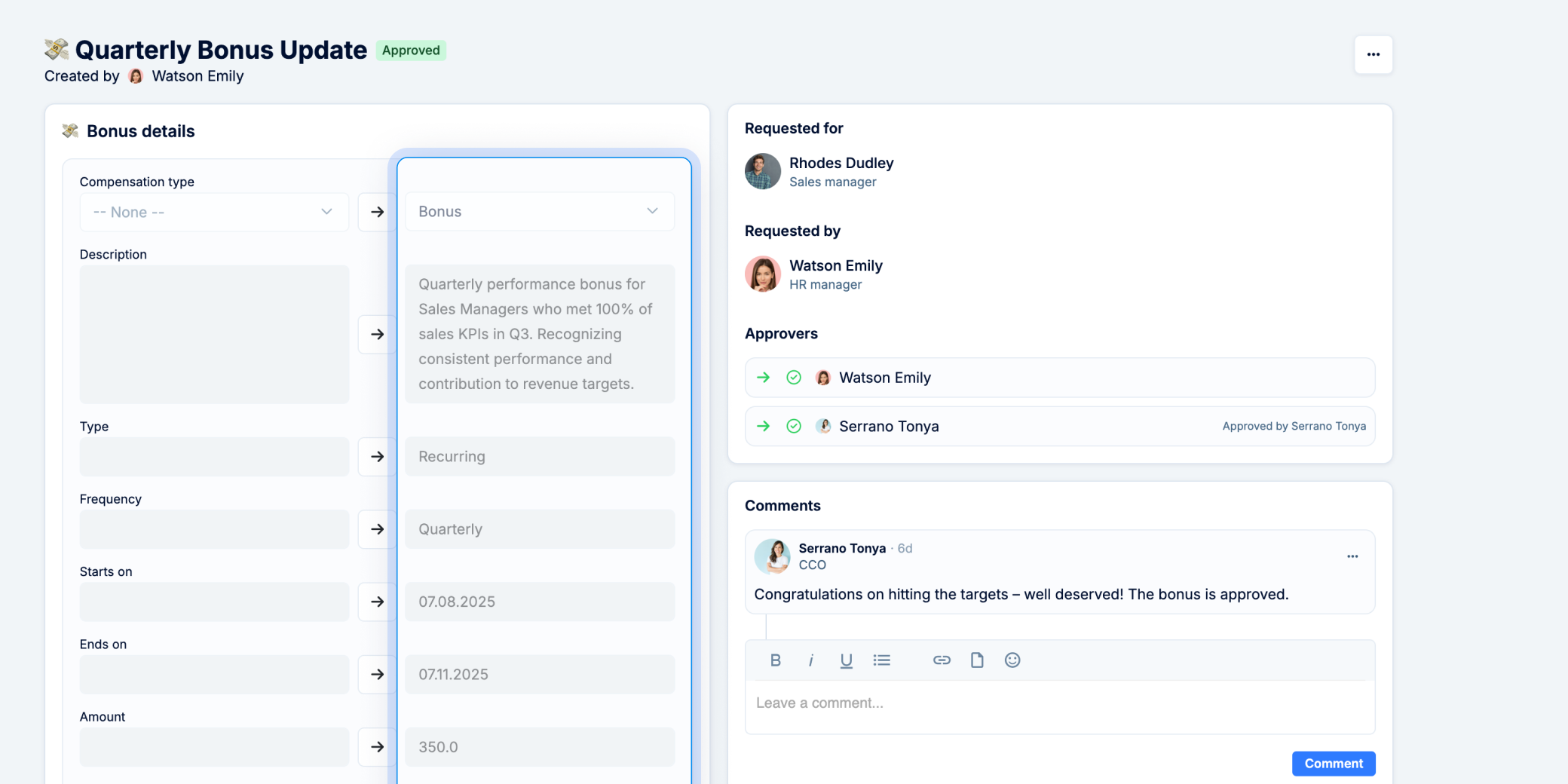

At Room 8, we use forms to handle updates to addresses, contacts, documents, compensation, bonuses, positions, and more. The approval process is now much easier – the specialist updates the data directly, HR gets a notification, and if needed, the request can be sent back for revision. A big advantage is that workflows can start right from the form, which saves a lot of manual work.
Marta Tomchuk, HRMS Administrator, Room 8 Group
A smarter alternative to Slack or email for managing requests

No lost requests

Clear approvals

Automatic updates

Less manual work
How Request Forms improve HR processes

Time back for strategic work
Transform request chaos into a structured and transparent process. Automated updates and clear approvals mean less admin — and more time for strategy.

Faster, smoother approvals
No blockers — decisions move quickly with the right people involved from the start.

Reliable data you can trust
Employee profiles stay up to date and compliant, with no risk of errors or outdated records.
Daily HR requests, solved with PeopleForce

Employee self-updates made easy
Employees can request changes to personal info — like updating a last name, new address, or uploading new bank documents using the appropriate form. HR approves then, and the profile updates automatically. If something’s missing, the request can be sent back for revision.


Tracked promotions and compensation changes
Managers can submit structured requests, from promotions to bonuses. Each form follows a customizable approval flow — you can involve HR, finance, or leadership as needed. After approval, workflows launch automatically — generating a new contract, creating tasks for finances, or sending a congratulations email, etc.


Optimized operational and business requests
From booking a business trip to requesting new equipment or expense reimbursement, employees submit all details in a clear form. HR can build fully customized forms with dropdowns, file uploads, or any field tied to employee data. Every request comes with clear tracking — employees and approvers see its status, history, and comments, while automatic notifications keep everyone involved up to date.


Hiring requests done right
Recruiters get a complete, structured request from hiring managers before opening a role. Custom Vacancy Request Forms let you include any fields you want — from salary range and required skills to team info and location. Once approved, the request instantly converts into a vacancy, avoiding missing data and manual entry.

Check out our customers' testimonials
Check out what real customers have to say about their experience with PeopleForce.
We truly value the Forms feature — it saves our HR team time and optimizes operations. We use the New Hire Form to trigger workflows after an offer is accepted, and a Preboarding Form as a questionnaire for new hires. Forms also cover custom and vacancy requests. The key advantage is the seamless, automated transition from candidate to employee — a smooth process from offer to onboarding.




It was really easy and fast to move from google sheets to PeopleForce! Everything is super intuitive and takes a minimal amount of time to set up. The onboarding team is great- they were always ready to answer your questions during the process. Also, the best thing is that customer support listens to your feedback and we have already implemented a few features from our feedback!


When I looked for the new HRMS, I was impressed with the flexibility of PeopleForce, where you can make whatever you need: access rights, automated flows, leave policies, recruitment process, and performance reviews can be configured precisely how you need them. The UI is intuitive, so new users adapt very quickly.


PeopleForce really boils down to your needs and workflow. It's very suited for medium-sized companies that want to automate their HR workflows, from presence logging to performance reviews. It's modular and very customizable, and you can see it evolve constantly, release after release.



Support managers are quick to respond and always available. With the nice interface of the platform, everything works without problems. Conveniently adjusted to our individual requests. Some features we would like to add, written about it to technical support and our wishes will be considered in the next releases. This is very pleasant and speaks of high-quality service.


The system is quite deep in terms of functioning. After the initial data import, it is quite intuitive to implement all the processes and even so, the Customer Success team is always available for a quick sync or an extensive implementation meeting. Overall we had 5 implementation meetings after which I felt quite confident to present the system to the rest of my team.


There's a lot to appreciate about PeopleForce. Firstly, their PTO tracking is seamless – a real time-saver. The ability to customize features adds a personal touch that's impressive. The 1-on-1 feature in the performance module is a standout, making interactions meaningful. Workflows and flexible settings are like a dream combo, tailored to our needs.


PeopleForce is a great tool that helps to structure and maintain main HR core processes in one place. It saves a lot of time when it comes to the operational part. The platforms are constantly developing by providing new and new opportunities while the price remains the same. Their Customer Service is super attentive and helpful. Great job, guys!


Frequently Asked Questions
What types of HR requests can be automated with Request Forms?
Everything from employee personal data updates, salary changes, and promotions, to travel requests, expense reimbursements, and vacancy requisitions.
Can I customize the forms to fit our processes?
Yes. You can build forms from scratch, use system fields, or add your custom fields. Each form can follow a tailored approval process.
How do approvals work?
Approvals are routed to the right people based on your setup. You can configure single or multi-step approvals with HR, finance, legal, or managers.
Do forms integrate with workflows?
Absolutely. Once a form is approved, it can trigger automated workflows like generating documents, notifying payroll, or assigning tasks to other teams.
What makes Request Forms different from Google Forms or chats?
Unlike generic tools, Request Forms are a part of your HR system. Approved requests update employee records automatically, ensuring accuracy and compliance.
Can vacancy requests become vacancies automatically?
Yes. Once the form is approved, a new vacancy is created with all the collected data — no manual data entry required.
Discover a smart way to manage HR requests
Let us show you how PeopleForce keeps every request structured, tracked, and automated, saving your HR team hours each day.