

HR efficiency estimator
How does the HR efficiency estimator from PeopleForce work.
Calculate your impact



Overtime automation: from manual tracking to payroll-ready hours

Look at a single week on almost any shift-based team. One person started a night shift at ten in the evening. Another worked a public holiday. A third stayed a few extra hours on an ordinary Friday instead of leaving on time. All three worked overtime — and none of it should be treated the same way.
The hard part isn’t noticing that someone worked longer. It’s everything that has to be decided about those hours before they can be paid. For each stretch of time you need to know the type of hours (ordinary, night, weekend, holiday, or some other category), the rate that applies to it, the way it’s compensated (money through payroll or time off), the portion of the shift each rule covers, the approval route it has to travel, and the format in which it finally reaches payroll. Get any of those wrong and the number at the end is wrong.
In most companies that logic isn’t written down anywhere a system can use it. It lives in an HR manager’s head —“Sunday is double, and after ten at night it’s time-and-a-half” — or in a separate Excel file that one person maintains and everyone else trusts. That works until the person is away, the team grows, or the company opens in a second country with different rules. Then the knowledge that used to fit in one head has to fit in a system.
That is what overtime automation is really for. Not a better calculator for extra hours, but a way to take the rules a company already follows and let the system apply them — automatically deciding, for each specific interval, what kind of hours these are, what rate they carry, how they’re compensated and who signs off.
Why ordinary time tracking isn’t enough
Most time-tracking tools can record that someone worked from 18:00 to 23:30. That’s the easy 20%. The other 80% is turning that raw interval into hours a payroll process can actually use — and that means classification, not just measurement.
The difference matters because a single shift is rarely one kind of overtime. Those same five and a half hours might contain ordinary evening hours up to a point and night hours after it, each at a different rate. On another day the whole shift could be weekend hours; on another, holiday hours; on another, a category specific to how that company treats overtime. Recording the total tells you how much. Classifying it tells you what it is — and only the second one is enough to pay it correctly.
Which rules apply — how many premiums, at what rates, on which days — differs from one jurisdiction and one company to the next. Some of it is set by employment law, some by company policy, some by what a particular team has agreed. The point isn’t to encode any one country’s rules; it’s that whateveryour rules are, the system should be able to hold them and apply them the same way every time, rather than leaving each shift to be interpreted by hand.
What actually needs to be automated
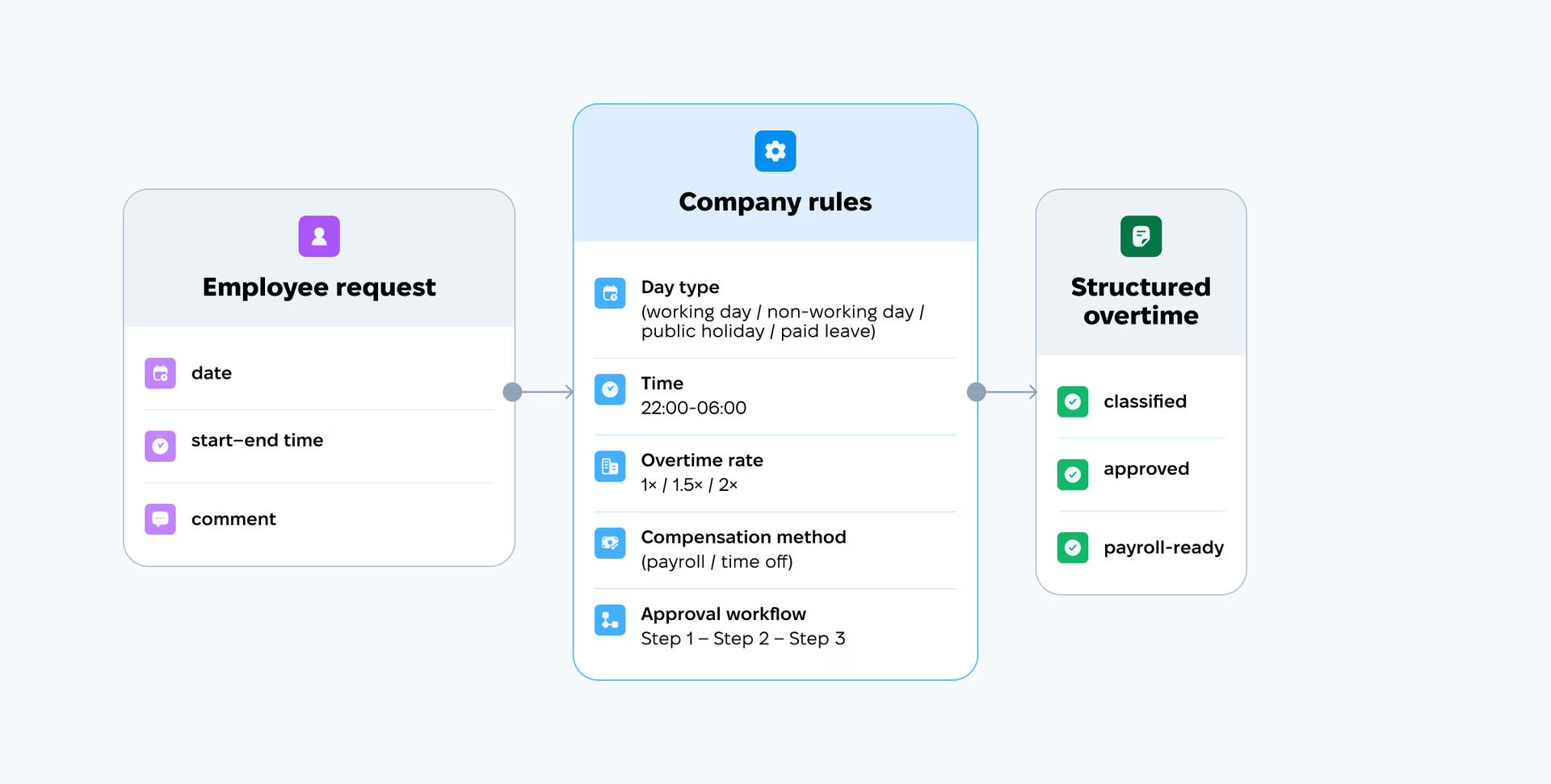
It helps to look at overtime as a process rather than a calculation. From the moment an employee works extra to the moment payroll receives clean data, there’s a chain of steps — and automation means the system carries the chain, not a person:
- The employee submits one request — a date, a start time, an end time, and a comment. Nothing else.
- The system checks the time and the day against the rules the company has configured.
- It splits the interval into the right types on its own — one request can become several lines when a shift spans more than one kind of hours.
- It applies the correct rate to each type.
- It sets the compensation method — paid through payroll or taken as time off — according to the type.
- The manager sees a finished breakdown and, if something’s off, corrects the classification before approving.
- The approved types, hours and rates flow into the time-tracking exports for payroll, with no intermediate calculation in a spreadsheet.
The employee never picks a type or a rate. The manager never slices the shift by hand. The rules do the classifying, and every person in the chain works with data that’s already structured.
A shift that’s two kinds of overtime at once
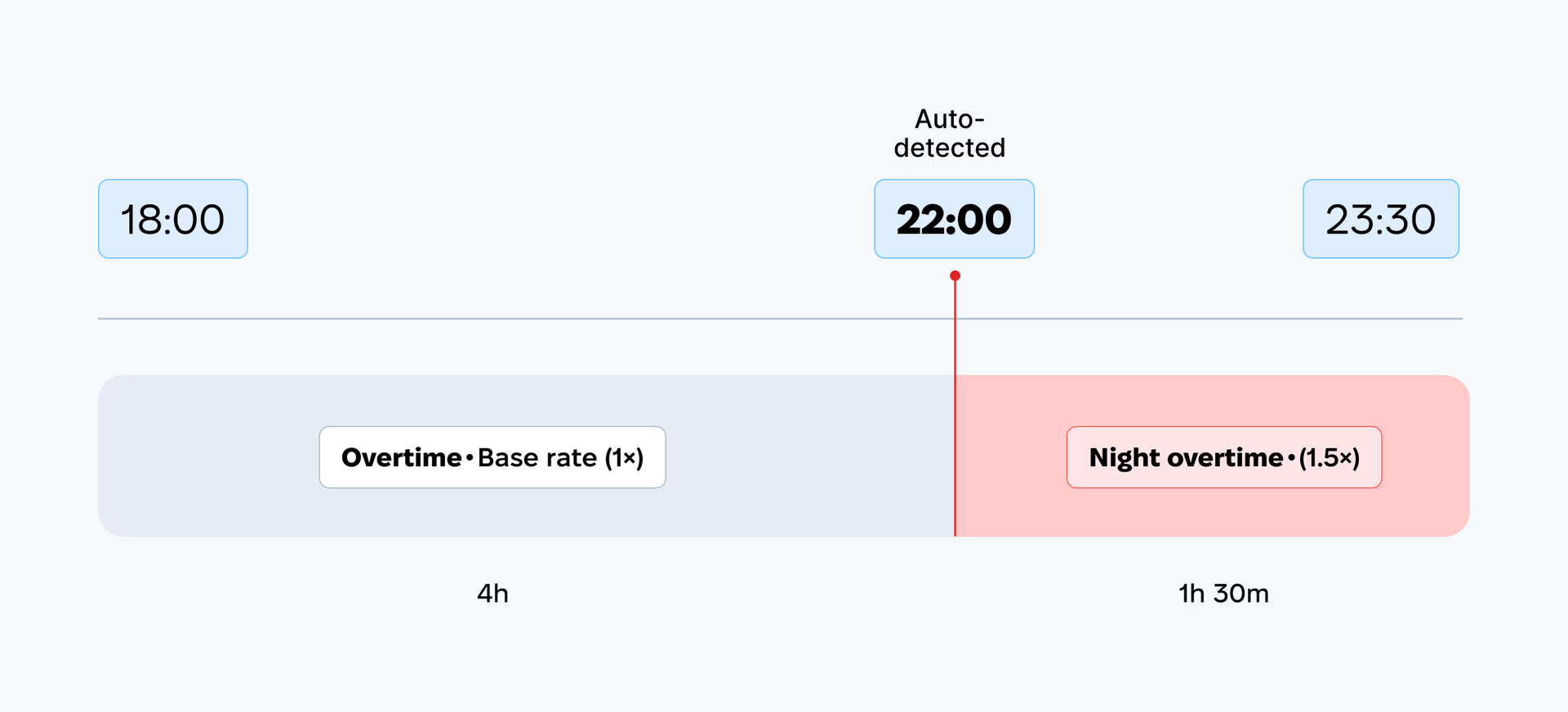
Take the 18:00–23:30 request. On paper it’s five and a half hours of overtime. In practice, if the company treats anything after 22:00 as night hours, it’s really two things: ordinary evening hours from 18:00 to 22:00, and night hours from 22:00 to 23:30 at a higher rate.
An automated system draws that line itself. It splits the one request into two lines — the evening stretch at its rate, the night stretch at its own — and shows them side by side. Nobody has to find the 22:00 boundary, work out the length of each part, look up which multiplier applies, and hope the arithmetic holds. The night-shift calculation that used to be a manual step is just what the request now shows.
That’s the difference between recording overtime and automating it. The same logic scales to weekend and holiday overtime, to overlapping premiums, to whatever combination a real shift throws at it.
A word on those overlapping premiums, because it’s easy to picture it wrongly: when more than one type could apply to the same stretch — say it’s both a Sunday and inside the night window — the system doesn’t stack or add the rates together. It resolves each stretch to a single type. A type with a specific time window (like night hours) takes precedence over a broader day-based one, so every segment ends up with exactly one rate. And because the winner follows the rules you configured rather than automatically taking the highest multiplier, it’s worth setting your types up deliberately.
The rules you can configure
This is where PeopleForce comes in — not as a fixed formula, but as a place where the company writes its own overtime logic and the system applies it. All of it lives in an attendance policy: a set of time-tracking rules assigned to employees by location (standard day length, whether approval is required, how overtime is counted). You can run several policies at once and assign them by location — one for the head office, another for a site that runs shifts — so different sites can follow genuinely different rules.
Inside a policy you define as many overtime types as the company needs, each with its own logic:
- A name for the type, so everyone reads the same label.
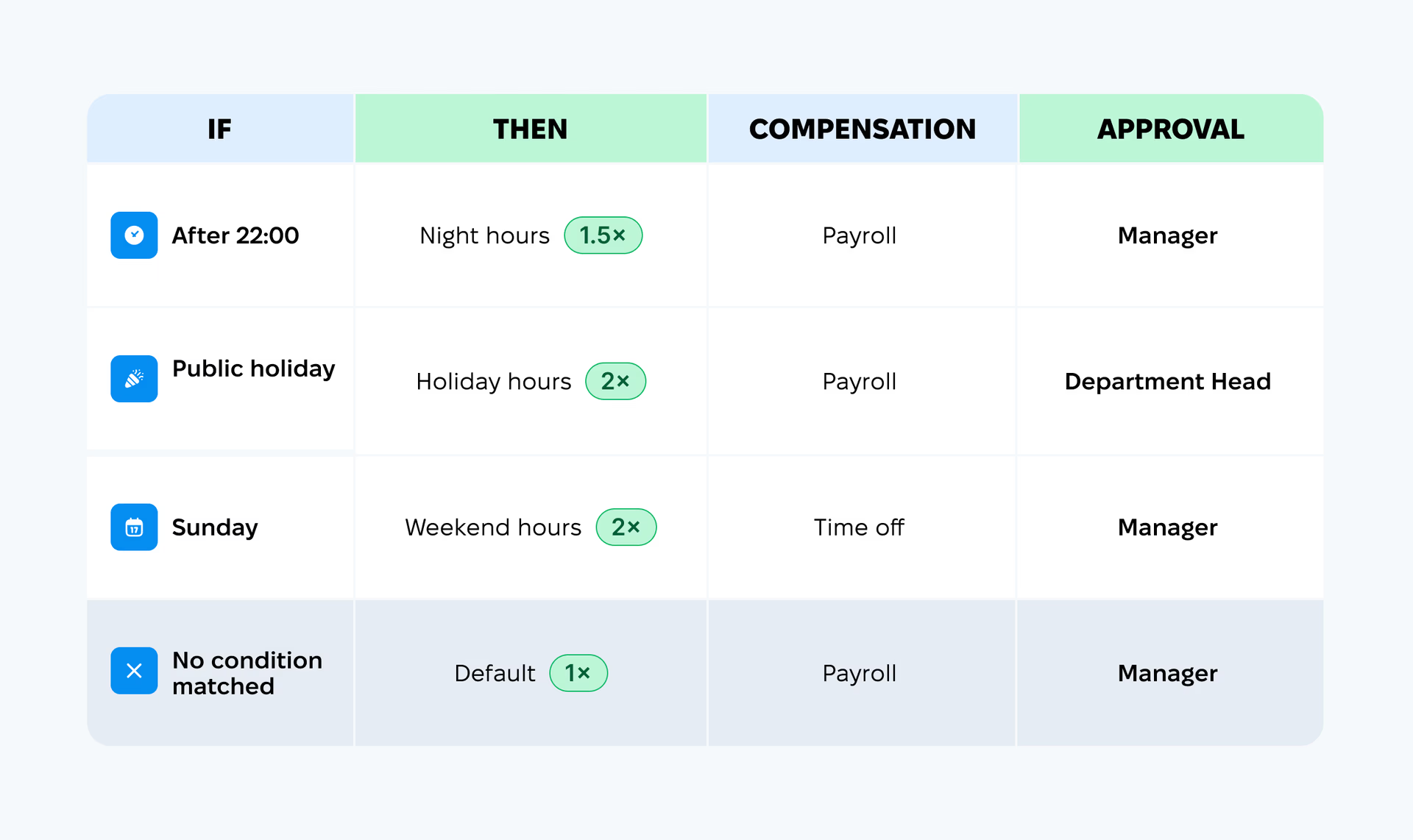
- A rate — a multiplier applied to ordinary pay. This is worth stating plainly: 1.5×means the full “time-and-a-half” rate — one hour counts as one hour and thirty minutes — not an extra +150% on top of base pay. Base pay is 1, 1.5 is time-and-a-half (typical for night hours), 2 doubles it (typical for holidays). As you enter it, the setting spells the maths out — “1h × 1.5 = 1h 30m” — so there’s no room for the +50%/+150% confusion.
- A compensation method — paid through payroll or taken as time off, set separately for each type, so one policy can hold both.
- An auto-classification condition — a type matches either by specific week days or by a day type (working day, non-working day, public holiday, or paid leave), not both at once, and you can narrow it further with an optional time window such as 22:00–06:00 for night hours. Where a day rule and a time window are both set, both have to hold for the type to apply.
- Instructions for the approver — text that appears to whoever approves a request of this type.
One type is always the default, at1×(base pay), with no conditions. It’s the fallback for anything that doesn’t match a rule, so no request is ever left unclassified, and it can’t be deleted.
Note what you don’t do here: you define the rules yourself rather than picking a country from a built-in list. For an international company, that’s the point — you configure a separate set of types for each jurisdiction’s requirements, instead of hoping a fixed template matches.
Approval is part of the automation, not an afterthought
Automating overtime isn’t only about the maths. It’s about controlling the process — and approval is where the control lives.
When overtime tracking is on, approval for it becomes mandatory automatically: no record slips through unchecked. The approval chain itself is yours to build, with as many steps as you need, and each step defined flexibly — direct manager, manager’s manager, team lead, department head, or a specific named person. It uses the same approval builder you already know from the rest of PeopleForce, set up right in the attendance policy, so there’s no separate overtime approval system to learn. The chain adapts to any structure, from a flat team with one approval level to a multi-level hierarchy.
Where there are several steps, they run in sequence, and the responsibility is split rather than repeated. The first approver sees the request already broken down by type and can correct a line in one click if the system picked the wrong type; every later step sees the already-verified result, read-only. Nobody re-does the same check.
The most useful part is smaller and easy to miss. For each overtime type you can write instructions for the approver, and they surface on the request itself, next to the line they apply to, at the moment the decision is made — for example, “approve only when this is work for a premium client and a deadline is approaching.” The rule stops living in a separate policy document that a manager read once and no longer remembers; it appears right where the hours are being approved, when it’s needed. That matters most for the expensive types — holiday and night hours — where companies usually want firmer grounds for approval, which is exactly the overtime approval workflow that’s hardest to enforce with a document nobody reopens.
None of this requires you to tell the system who reports to whom. It already knows, from Core HR — so “direct manager” resolves to a real person, department reports show the right people, and each employee automatically gets the attendance policy assigned to their location. The more carefully those basics are kept, the less you configure everywhere else.
What the company stops doing by hand
Put the automation next to the old routine and the operational value is concrete. These are the tasks that disappear:
- Slicing a shift apart with a calculator. For an 18:00–23:30 shift, you no longer work out yourself that four hours are ordinary and one and a half are night hours at a different rate. The request shows it as two lines.
- Keeping rates in your head or a separate file. “Sunday is 2×, after ten in the evening it’s 1.5×” stops being one person’s knowledge and becomes a setting everyone working with requests can see.
- Double-checking whether the multiplier is right. Every request shows the type and the rate before approval — the employee and the manager see the same picture before the numbers move on, not after.
- Explaining approval rules to managers by hand. The instructions surface at the moment of decision instead of in a policy document you have to keep re-sending.
- Reconciling overtime data at month end. The type and the correct rate are already attached to each request, so there’s nothing to piece back together.
- Carrying data from time tracking into payroll through Excel. The classified, approved hours are already in the export, ready to move on.
Notice these are specific operations, not a vague promise to “save time and reduce errors.” The time saved is the calculator step; the errors removed are the mis-picked multiplier and the month-end mismatch.
From accurate time tracking to payroll-ready data
The output of all this isn’t just a tidy overtime request. It’s structured data for every approved request:
- the number of hours,
- the type,
- the rate,
- the compensation method,
- the approval status.
Those fields are captured and verified on the request itself, so the hours arrive already sorted into types and rates rather than as raw time someone still has to classify. From there the classified hours and their rates feed your time-tracking exports, ready to hand off to your payroll process without an intermediate pass through a spreadsheet to work out what each hour was. That’s the practical meaning of “payroll-ready time tracking”: the data leaves time tracking already sorted into types and rates, not as undifferentiated hours.
To be clear about what the system does and doesn’t do: it classifies the hours, applies the rate multiplier and hands over clean, structured data. It doesn’t itself calculate the final money owed — that stays with your payroll process, which now receives correct inputs instead of raw ones.
One migration note for existing PeopleForce customers. Turning this on doesn’t disturb anything you already have. Existing records stay untouched, and the new rules — including the default type — apply only to requests submitted after you configure them. So you can add types gradually — night hours first, the rest whenever suits — and the rates you set now don’t rewrite history: each request remembers the rate that was in effect when it was classified.
This is the first, foundational step toward flexible overtime tracking. Further along the same road is a direct integration with Payroll Hub, our payroll calculation module — currently in testing with a limited group of companies and becoming more widely available soon — which will also bring automatic transfer of time-off-method hours straight into the leave balance, removing the manual month-end step. That part is still ahead. The classification, the correct type and the correct rate the moment a request is submitted are available today.
How to automate overtime tracking in PeopleForce — in five steps
For teams already in PeopleForce, the setup is short:
- Go to Settings → Attendance Policies and open the policy you need (or create a new one).
- On the Overtime step, turn on the overtime-tracking toggle.
- Click Add new and create a type: name, rate (a multiplier of ordinary pay — e.g. 1.5 for time-and-a-half), and compensation method (payroll or time off).
- If you need it, set the auto-classification condition — specific weekdays or a day type (working day, non-working day, public holiday, paid leave), plus a time window for night hours if that matters.
- Save. The type joins the list immediately, and the system starts applying it automatically to new requests.
Where overtime automation actually starts
Automating overtime doesn’t start with a payroll formula. It starts with writing the rules down in a form the system can act on: when a given type of hours arises, what rate it carries, how it’s compensated, who approves it, and where the data goes next. Once those are defined, the counting, the splitting, the rate and the routing stop being manual work — and the hours arrive at payroll already classified, approved and ready.
See how PeopleForce can automate overtime tracking for your teams — from the first classified request to a payroll-ready export.


One login. Every HR tool you'll need.
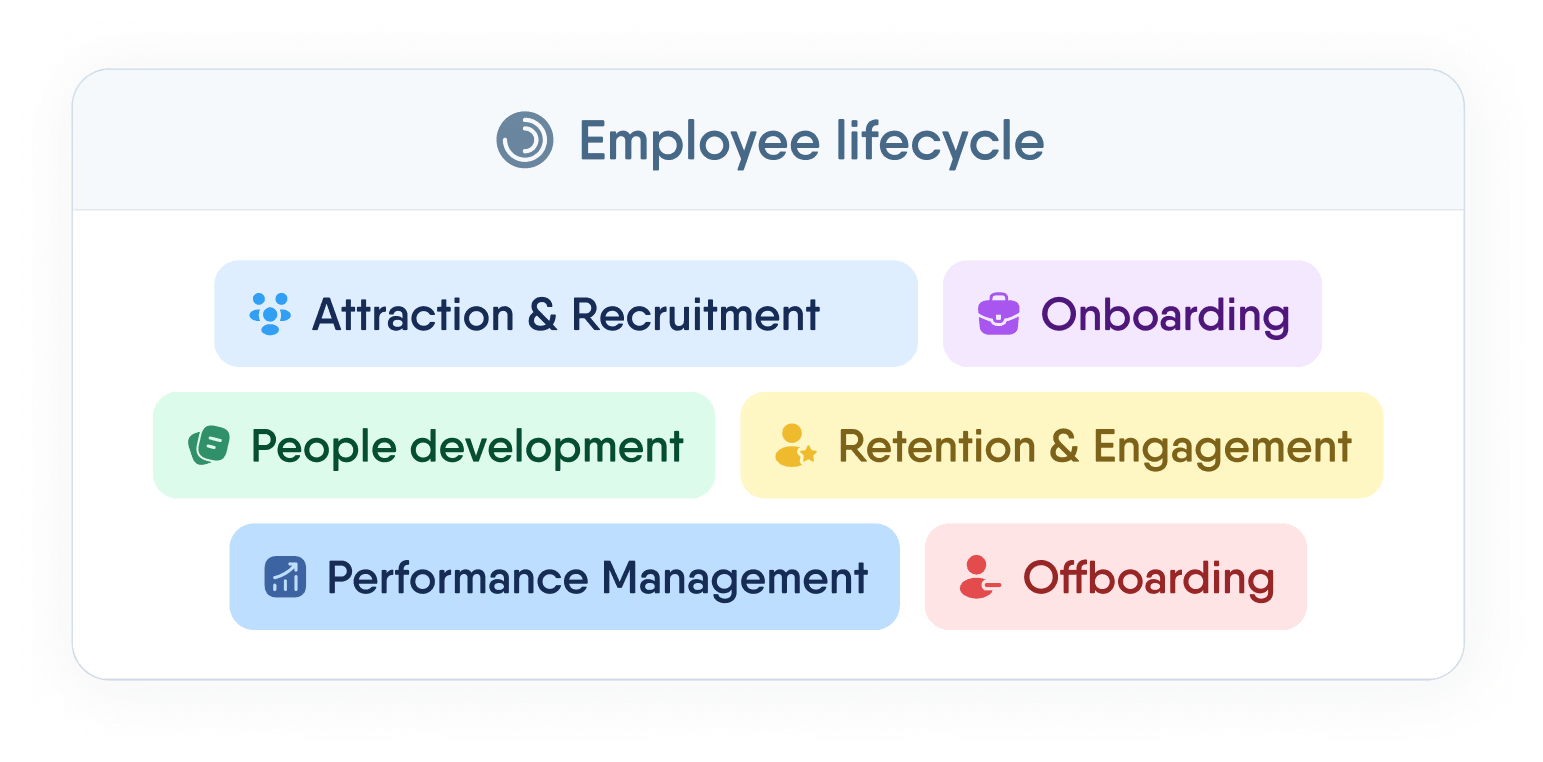
Manage the full employee lifecycle — from first interview to final offboarding — without switching tabs or losing data.
Recent articles
Pay Review Process: A Step-by-Step Guide for HR Teams
A practical, step-by-step guide to running a pay review, from setting objectives and benchmarking to modelling increases and communicating decisions.
PeopleForce and BPiON Join Forces — for Seamless HR Collaboration with Payroll
PeopleForce and BPiON streamline HR and payroll with seamless Enova integration, reducing errors, automating workflows, and saving time.
How does the HR efficiency estimator from PeopleForce work
A transparent breakdown of the PeopleForce HR Efficiency Estimator methodology