Pay transparency reporting, built on your job grades and pay bands

Your organisation defines how roles are evaluated. From the grades onward, PeopleForce holds the structure, calculates the indicators the directive names from live compensation data, and keeps the differences behind them reviewable.

Pay transparency reporting, built on your job grades and pay bands

Where the regulation stands

24 Dec 2025

In force

Pay or pay range stated in the job advert, or before the interview. No questions about previous pay.

7 Jun 2026

Not yet transposed

The EU deadline. The Polish implementing act is still a draft, so the reporting duty is not yet national law.

Jan 2027

Reporting period begins

Under the draft, the first reporting period is calendar year 2027 — the data behind the first report starts here.

7 Jun 2028

First report · draft

First report due for employers of 100 or more — counted in annual work units, not headcount. 100–249 report every three years, 250 and above every year.

Before you start

Job evaluation comes first

PeopleForce works with the job evaluation and grading structure your organisation already uses. If your roles are not yet evaluated and grouped into grades, that step needs to be completed first.

Job evaluation is already in place

Roles have been evaluated — with Sedlak & Sedlak, Korn Ferry, Mercer, the Hay method or an internal committee — and sit in levels with pay bands.

  • Import the existing grade and band structure
  • Calculate the directive's indicators from live compensation data
  • Review who sits outside their band, and record why
  • Handle employee pay information requests in one place

Part of Core HR. Not a paid add-on.

Job evaluation is not yet in place

Start by defining how roles are evaluated and grouped into grades. Until that exists, there is no structure for a pay gap report to work from.

Evaluation means assessing every role against objective, gender-neutral criteria — skills, effort, responsibility and working conditions. Under the Polish draft act those criteria are agreed with the trade unions; if no agreement is reached within 30 days, the employer may set them itself and must notify the district labour inspector within five days. This is a decision the organisation makes and signs; no HR system produces it.

Where to start

Job evaluation consultancies do this work. We collaborate with Kaizen HR and can make an introduction.

Once grades exist, the import takes an afternoon.

Scope

From job evaluation to pay transparency reporting

Your organisation defines how roles are evaluated. From there the chain runs inside one system: the grades and bands you bring in, the compensation records they sit against, the indicators calculated from both, and the conversations that follow.

Your organisation

Job evaluation

Consultants or an internal committee Criteria agreed with worker representatives (Polish draft) Result: a grade per role

Core HR

Grades & pay bands

Job catalog: profiles, levels, job groups, Band minimum and maximum per profile. Loaded from one spreadsheet

Compensation

Compensation data

Components: base, bonuses, allowances. From any payroll system by API or scheduled import. Or written straight in by Payroll Hub

Core HR reports

Pay gap reporting

The seven pieces of information Article 9(1) names Drill-down to the individual Excel export in two sheets

Core HR

Employee communication

Pay information requests on forms you design. Pay policy in the knowledge base. Band in the employee's own profile.

Job catalog import template

Job profile · Level · Job group (required) · Skills · Minimum and maximum base compensation, stated as annual figures · Currency · Custom fields. Levels and job groups that do not exist yet are created as the file loads, and re-importing updates the structure whenever grades change.

The report

Pay gap indicators

Select an indicator to see how it is calculated and where it appears in the report. Every figure on these screens also leaves the system as an Excel file.

Export to Excel

Two sheets: the fourteen figures a filing asks for, and a row per employee. Prepared in the background — a download link arrives by email and stays live for thirty days.

GUS has not published a reporting format. Once it does, the export will be updated to match it.

Unadjusted pay gap

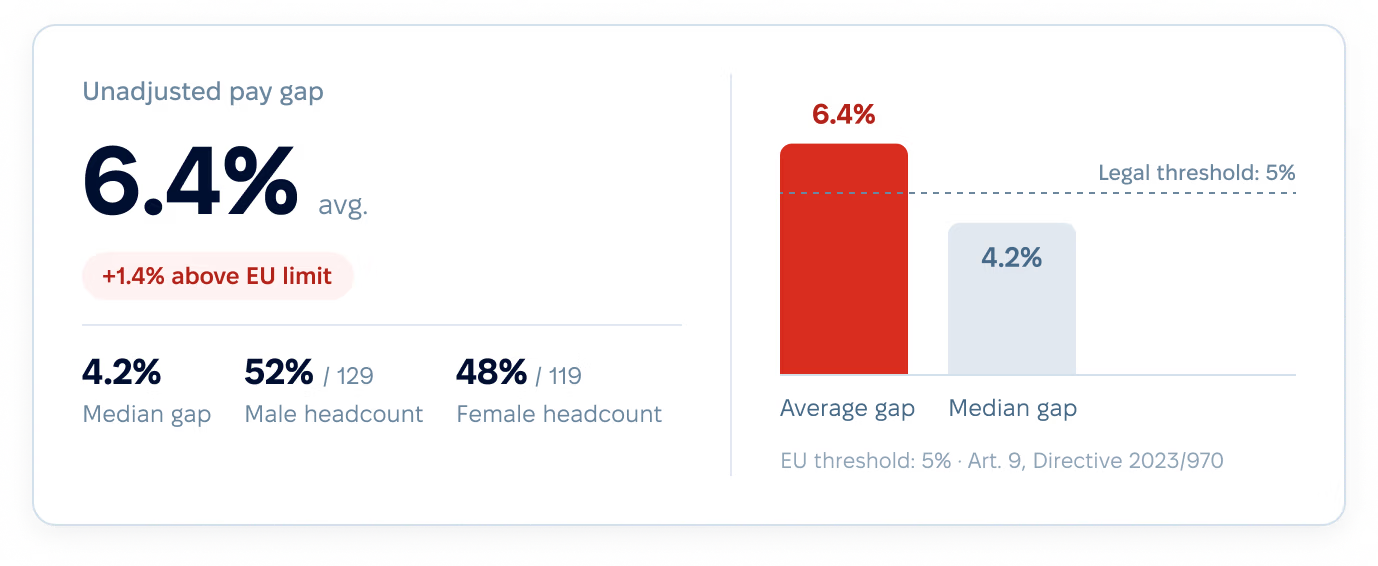
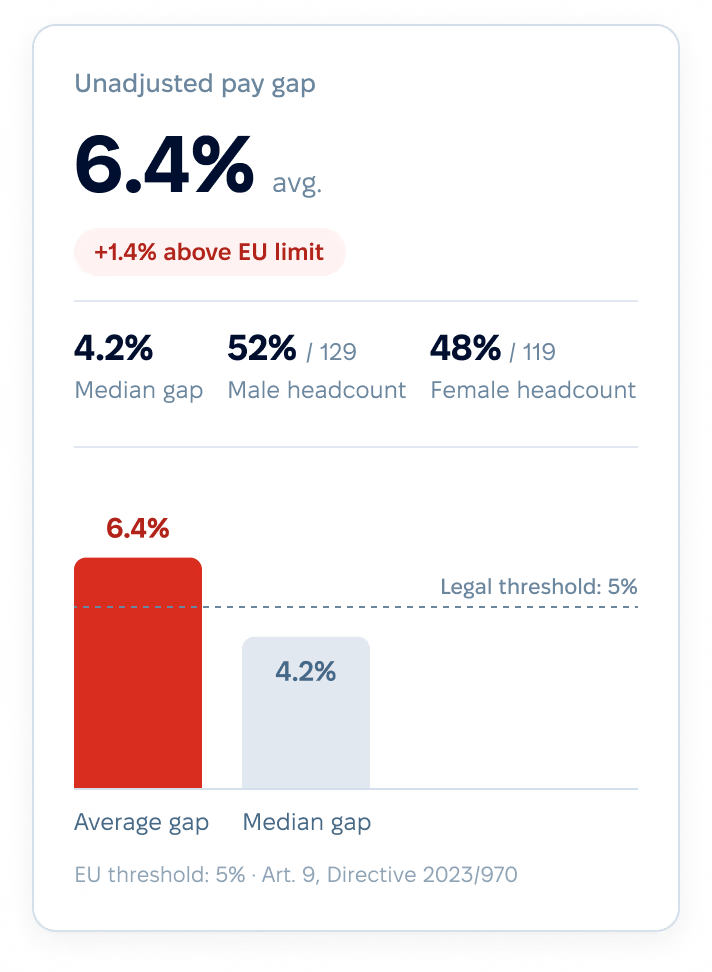
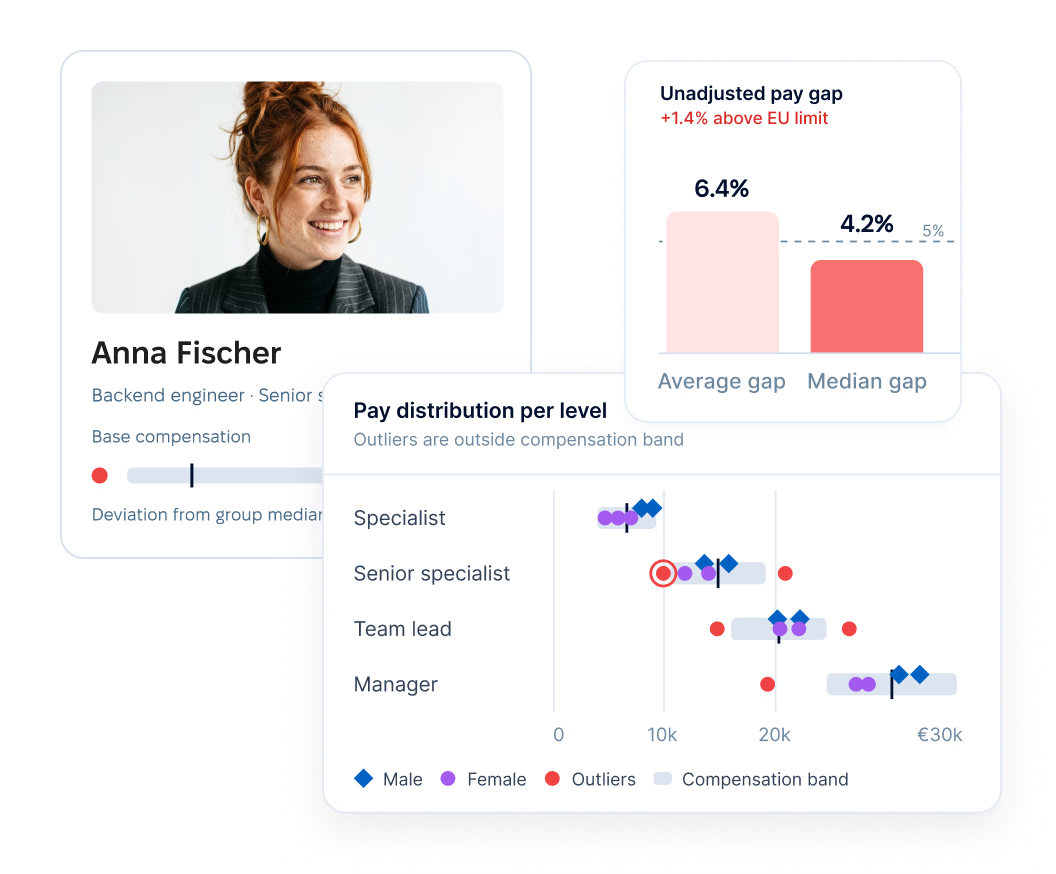
The mean and the median gender pay gap, in one tile — points (a) and (c) of Article 9(1). The difference between average pay for men and for women, as a percentage of men's average pay, with the median of each group beside it.

Unadjusted pay gap

In the Excel export: Summary sheet, first two columns — Mean and Median Gender Pay Gap (%)

The mean and the median gender pay gap, in one tile — points (a) and (c) of Article 9(1). The difference between average pay for men and for women, as a percentage of men's average pay, with the median of each group beside it.

Unadjusted pay gap

In the Excel export: Summary sheet, first two columns — Mean and Median Gender Pay Gap (%)

Export to Excel

Two sheets: the fourteen figures a filing asks for, and a row per employee. Prepared in the background — a download link arrives by email and stays live for thirty days.

GUS has not published a reporting format. Once it does, the export will be updated to match it.

Review

Outliers and justifications

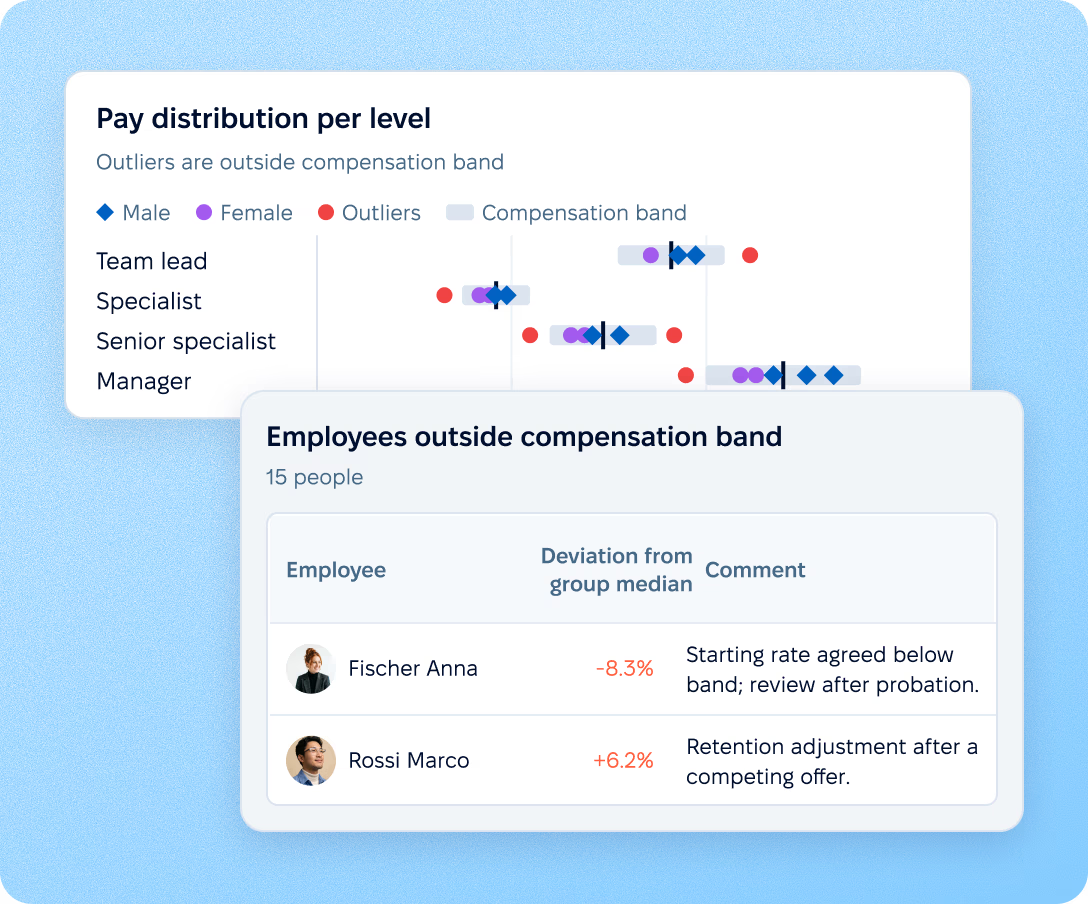
Every employee is plotted against the pay band of their level. Opening the review lists the ones outside it — their band, their pay, and how far past the edge it falls. Differences usually have a reason: a counter-offer, a long-tenured hire, a specialist role. That reason lives as a comment on the person's pay record and travels into this list, in the same row as the deviation. Behind it sits the change history: the previous value, the new one, who made the change, when, and the date it takes effect.

Identifying a gap and resolving it are two separate pieces of work. This is where the second one happens.
Outliers and justifications

After the analysis

Talking to employees about pay

Four requests account for almost all of it: what am I paid and how was that set, what is the average for people doing work of equal value, how pay and promotion decisions are made, and a demand for corrective action. Give employees a structured way to ask — with every response documented in PeopleForce.

  • Make the approach clear

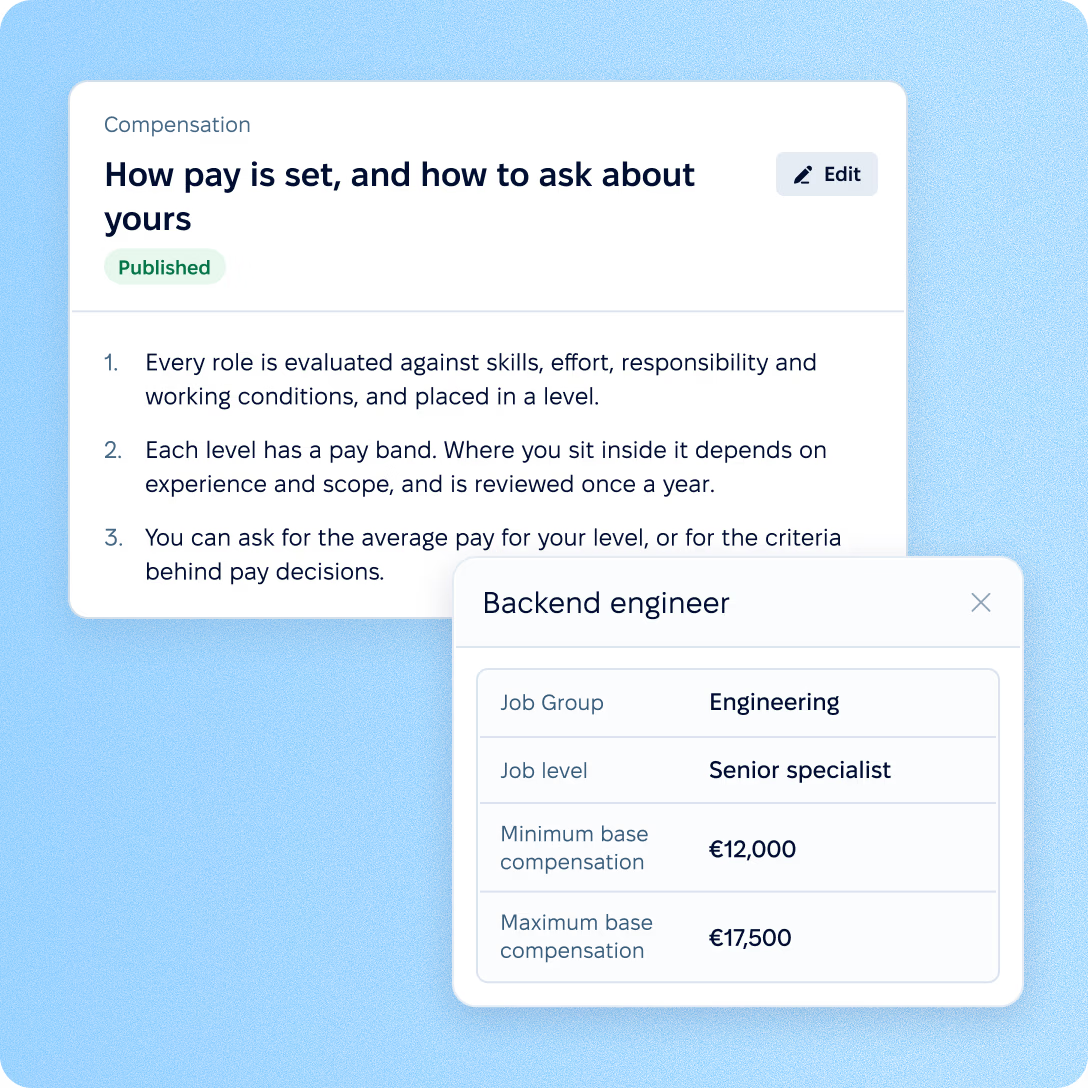
    Keep your pay policy and grading approach in the knowledge base, so HR and managers answer from the same source. Where enabled, employees can also see the pay band for their role in their profile.

  • Manage pay information requests

  • Respond and keep a record

preview

Access and control

Controlling access to compensation data

Pay data doesn't have to be visible to everyone who has access to an employee record. Control who can see it, who can change it, and keep a record of every change.

  • Control who sees what

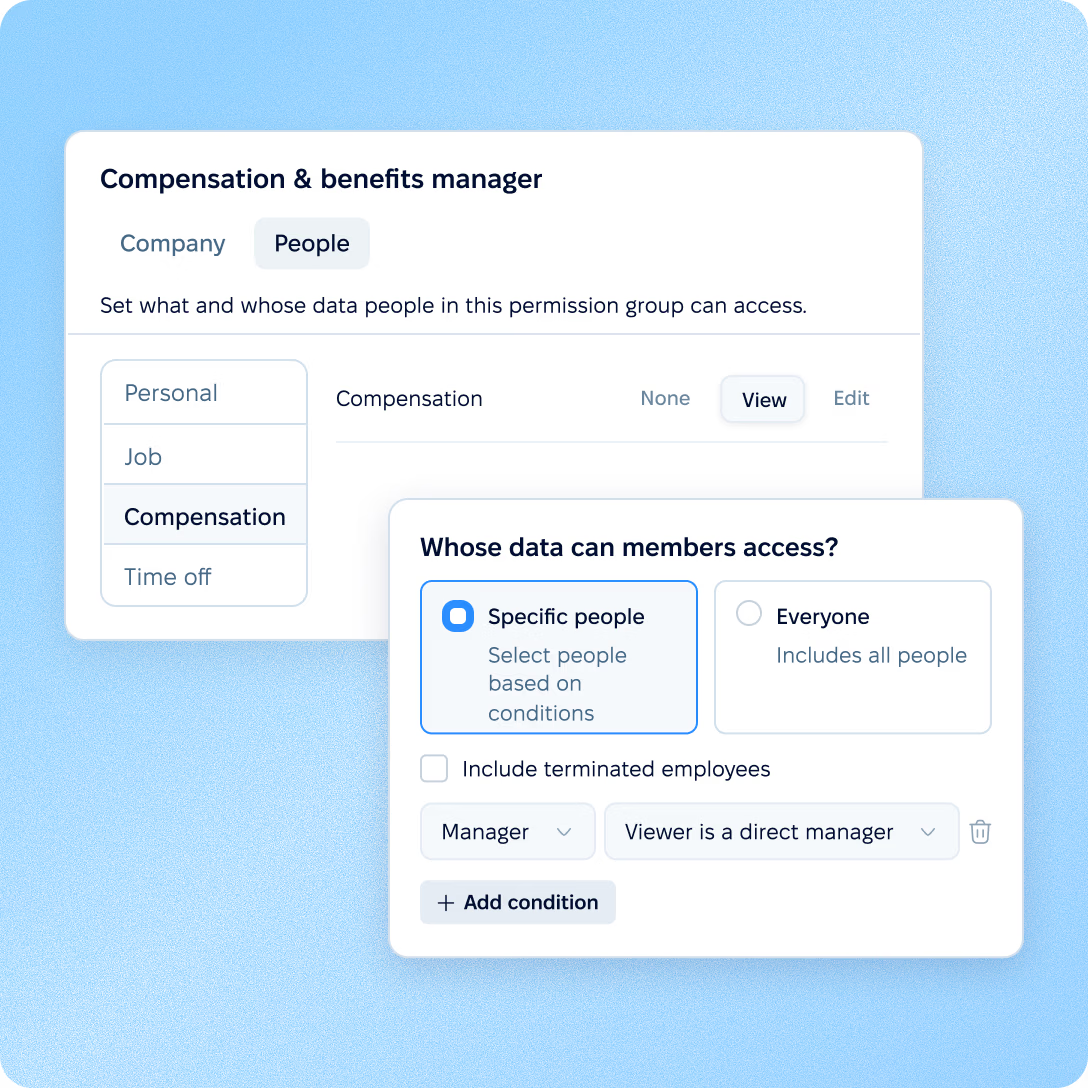
    Compensation has its own permissions, separate from the rest of the employee record. Define who can view or edit pay data — and whose data they can access.

  • Control how pay changes

  • Know what changed

preview

More in Core HR

Explore the rest of Core HR

Everything around pay data, from access rules and policies to requests, signed documents, workflows and the org chart, in one connected system.

Access rules for every employee field

Rule-based roles and field-level permissions decide who sees which employee data, pay included.

Learn more
HR security

Beyond the features

Why HR teams choose PeopleForce

We get you live in weeks, not months — with real people answering after go-live, and room to add the rest of HR when you’re ready.

Live in up to four weeks

A dedicated success manager guides your setup — it’s included in the plan, not a paid add-on.

Multilingual support

Real people answer: a ~2-minute first reply and 98% satisfaction.

Room to grow

Start with Core HR and add recruiting or performance later — same employee record, no second system.

icon

Leader

Summer 2026
icon

Users Love Us

Milestone Summer 2026
icon

Regional Leader

Europe Summer 2026
icon

High Performer

Europe Summer 2026

Security and operational continuity

Certifications, granular access and full control over what happens to your data.

ISO 27001 certified, GDPR compliant, Google Cloud data centres in Europe
G2Best Support

Common questions

Does the pay gap report cost extra?

Our salaries are held in Enova. Does that work?

Can we publish a pay range in our job adverts?

How are B2B contractors handled?

Do you provide market salary benchmarks?

We are a group of companies. Can we report per legal entity?

How do we get the figures out, and what about the GUS format?

How long does implementation take?

See the report on your own data

A 30-minute call in Polish or English, walking through the report with your grade structure. If job evaluation turns out to be the open question, we will say so and point you to a partner.