

HR efficiency estimator
How does the HR efficiency estimator from PeopleForce work.
Calculate your impact



How to calculate overtime automatically: night, weekend and holiday rates in one system
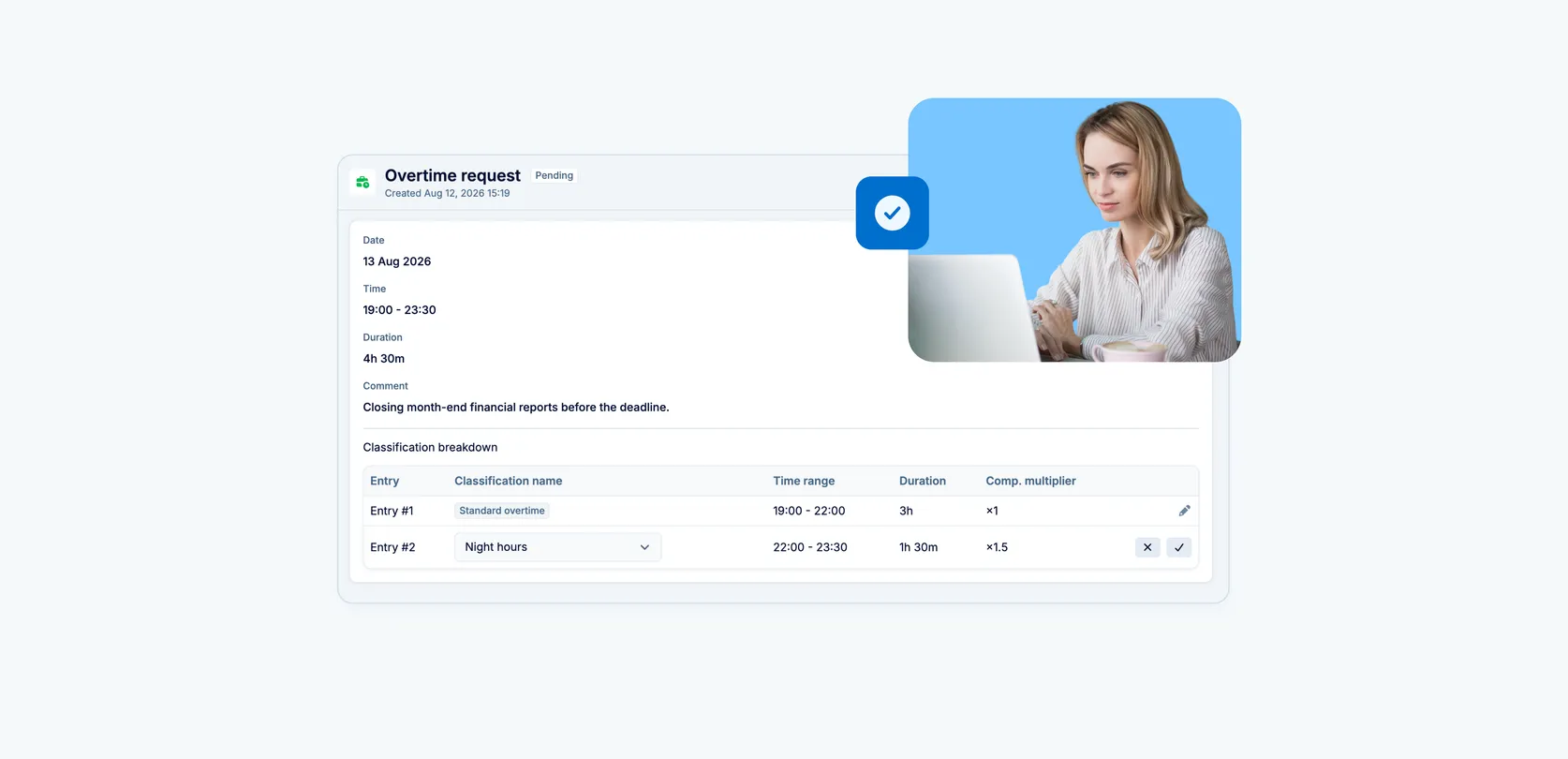
 2026-08-25
How to calculate overtime automatically: night, weekend and holiday rates in one system

Someone on your team just started a night shift. Someone else worked a public holiday. And another person put in a few extra hours instead of leaving early on Friday. The question isn’t whether to compensate that — it’s how much, exactly, and in what form: money or time. If the answer to that still lives in an HR manager’s head or in a separate Excel file, this one’s for you.
Overtime rarely means the same thing from one company to the next. In manufacturing, a night shift is paid differently from a day shift. In retail, weekend work is its own rate. In teams with rotating schedules, some people would rather have the money and others would rather have the time off. And in some places, employment law explicitly requires different premiums depending on the day and the hour.
A platform that tracks working time has to hold all of those nuances at once — not through separate settings bolted on “for every case”, but as a single flexible logic. That’s exactly what sits behind the reworked overtime tracking in PeopleForce, an HR platform where time tracking, people data and approvals all live in one place.
Already tracking time in PeopleForce? Skip ahead to the setup section — it covers everything you need to do, and what happens to the data you already have.
When not all overtime is equal
- Manufacturing, logistics, retail, contact centres — anywhere with shift work, where night, weekend or holiday hours are paid differently from ordinary ones.
- Companies operating in several countries — where employment law sets different overtime premiums depending on the day and the hour. Importantly, you define the rules yourself rather than picking from a list of countries baked into the system, so you can configure a separate set of types for each jurisdiction’s requirements.
- Teams with a mixed compensation culture — some people are paid for overtime, others prefer time off in return, and that can differ even within a single team.
- Teams that are scaling — where overtime tracking still rests on verbal agreements and spreadsheets, and it’s time to formalise it in a system without losing the flexibility.
You set the rules — the system does the counting
All time-tracking rules in PeopleForce live in what’s called an attendance policy — a set of settings you apply to a group of employees: how many hours their standard day is, whether approval is required, how overtime is counted. You can have several policies — one for the office and one for shift staff, for example.
That’s where an admin configures as many overtime types as the company needs, each with its own logic:
- Rate — the multiplier applied to ordinary pay for this type of hours. Base pay is 1, so you enter 1.5 for time-and-a-half (e.g. night hours) and 2 for double pay (e.g. holidays).
- Compensation method — paid in payroll or taken as time off, set separately for each type.
- Auto-classification condition — specific weekdays or a day type (working day, non-working day, public holiday, or paid leave), plus an optional time window such as “22:00–06:00” for night hours.
- Instructions for the approver — the text shown to whoever approves a request of this particular type.
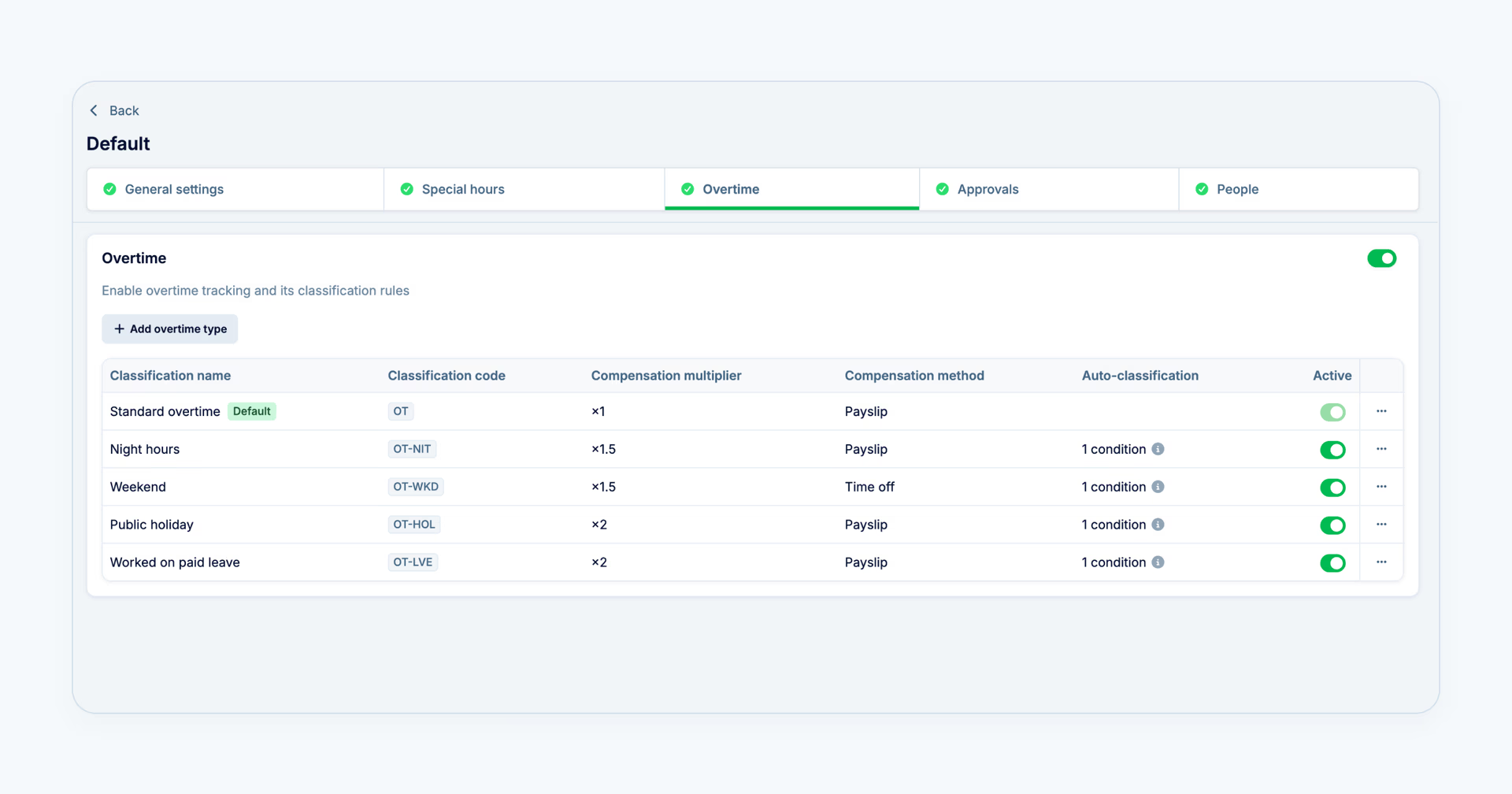
Figure 1. Overtime types setup — Settings → Attendance Policies → [policy] → “Overtime” step
The employee sees and chooses none of this. They submit an overtime request exactly as they always have, entering only a start and an end time.
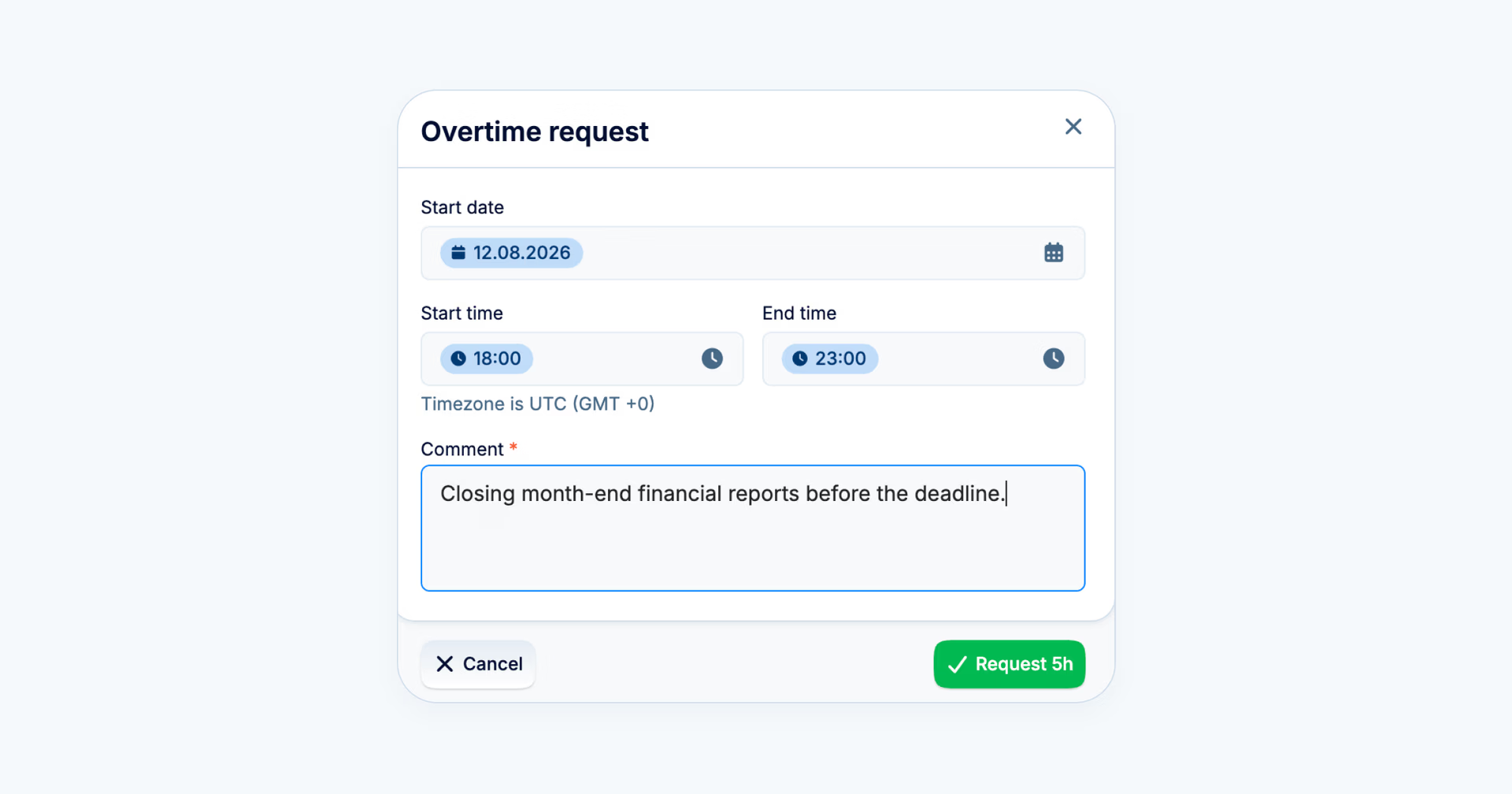
Figure 2. The request form as the employee sees it
From there the system takes over: it checks the hours against your configured rules and splits the request into the right types on its own. If a shift falls partly in night hours and partly in an ordinary evening, both stretches appear in the request separately, each with its own correct rate.
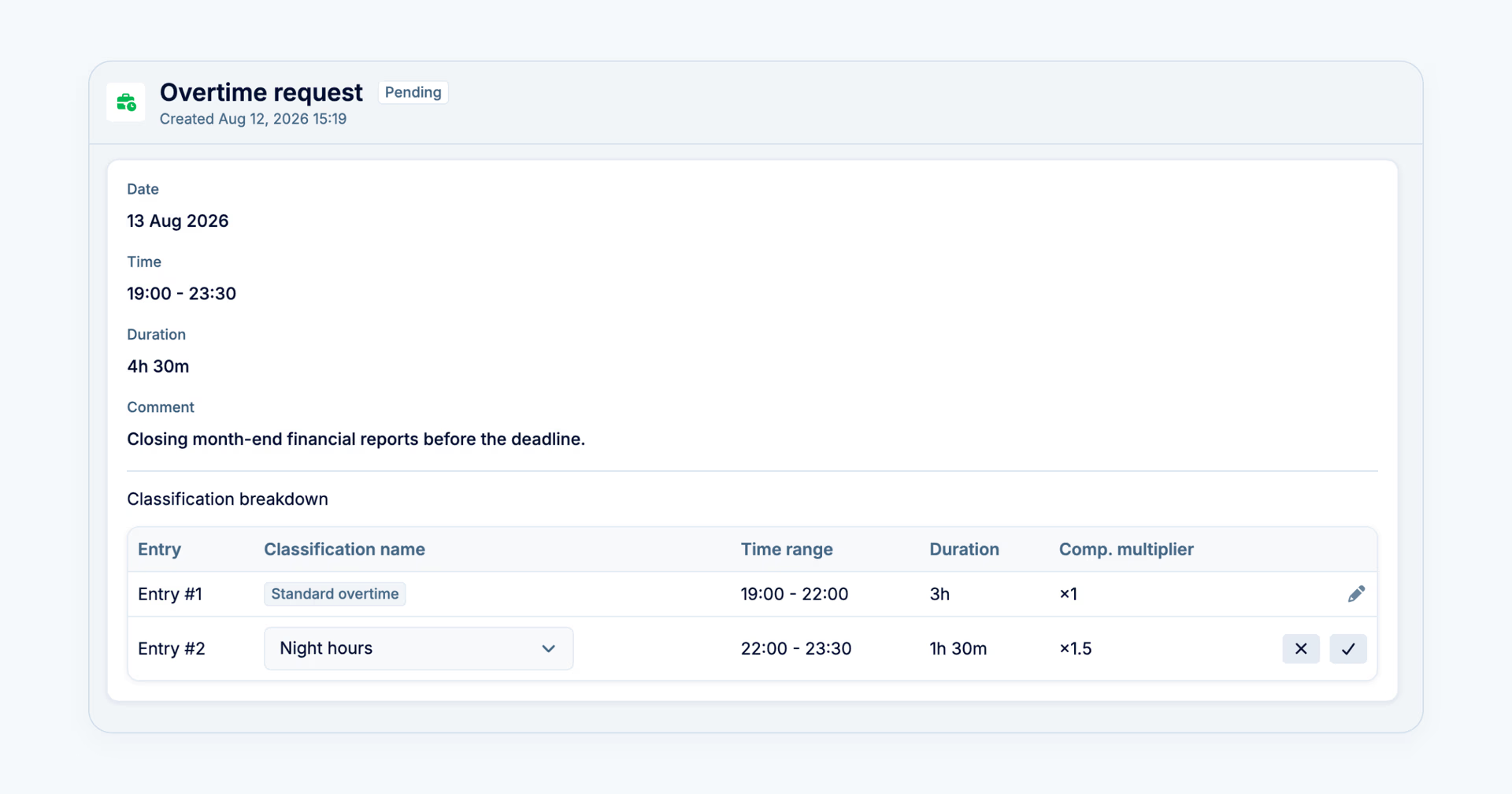
Figure 3. The request broken down by type — what the approver sees
The approver sees the finished breakdown straight away and, if needed, can correct the type on a specific line in one click before approving.
The rate is a multiplier applied to ordinary pay, not a premium added on top: a value of 1.5 means “time and a half” (one hour counts as one hour and thirty minutes), 1 is regular pay, and 2 doubles it. The setting itself makes this visible — the system shows “1h × 1.5 = 1h 30m” as you type, so there’s no room left for confusion.
Setup in five steps
- Go to Settings → Attendance Policies and open the policy you need (or create a new one).
- On the Overtime step, turn on the overtime tracking toggle.
- Click Add new and add a type: name, rate (a multiplier of ordinary pay — e.g. 1.5 for time-and-a-half), and compensation method — paid in payroll or time off.
- If you need it, set the auto-classification condition — specific weekdays or a day type (working day, non-working day, public holiday, or paid leave), and a time window such as night hours if that matters.
- Save — the new type appears in the list alongside the others immediately, and the system starts applying it automatically to new requests.
One type always stays the default — at1×(base pay), no conditions. It’s the fallback for anything that doesn’t match any of your rules, so no request is ever left unclassified.
If you already track overtime in PeopleForce. You don’t need to do anything — everything keeps working as before. Your existing records stay untouched and take the default type, and the new rules apply only to requests submitted after you configure them. So you can add types gradually, at your own pace: night hours first, say, and the rest whenever you have time to look into it. The rates you set now don’t rewrite history either: each request remembers the rate that was in effect when it was classified.
You decide who approves
Overtime approval isn’t tied to one fixed role either. Each company builds its own approval chain with as many steps as it needs, and each step can be defined flexibly: direct manager, manager’s manager, team lead, department head, or even a specific named person. That chain adapts to any organisational structure — from a flat team with a single approval level to a multi-level hierarchy — and it uses the same approval builder you already know from the rest of PeopleForce, set up right in the attendance policy, so there’s no separate overtime approval system to learn.
But the most useful part here is something else. For each overtime type you can write instructions for the approver — and they appear in front of them at the exact moment the decision is made. For example: “approve only when this is work for a premium client and a deadline is approaching.”
The difference is subtle but real: your overtime policy stops living in a separate document that a manager read once and, in all likelihood, no longer remembers. It shows up where the decision happens, at the moment it’s needed. That matters most for holiday and night types — the most expensive ones, and therefore the ones where companies usually want firmer grounds for approval.
When overtime tracking is on, approval for it becomes mandatory automatically — no record slips through unchecked. And where there are several approval steps, they work in sequence: the first approver sees the request’s breakdown by type and can correct it in one click if the system picked the wrong one, while each subsequent step sees the already-verified result. Responsibility is distributed across the steps instead of every step repeating the same check.
What you’ll no longer do by hand
- Slicing a shift apart with a calculator. If someone worked 18:00 to 23:30, you no longer work out yourself that 4 hours are ordinary and 1.5 are night hours at a different rate. The system shows it as two lines directly in the request.
- Keeping rates in your head or in a separate file. “Sunday is 2×, and after ten in the evening it’s 1.5×” stops being one person’s knowledge and becomes a setting everyone working with requests can see.
- Double-checking whether the maths is right. Every request shows the type and the rate before approval — the employee and the manager see the same picture before the numbers move on, rather than after.
- Reconciling data by hand at month end. The type and the correct rate are already in the time-tracking export, so they can go straight into payroll calculation without an intermediate pass through Excel.
This is the first, foundational step towards flexible overtime tracking. Further along the same road: a direct integration with Payroll Hub, our payroll calculation module, which is currently in testing with a limited group of companies and will become more widely available soon. That will also bring automatic transfer of hours on the time-off method straight into the leave balance, without the manual step at month end. And the rate and type, calculated correctly the moment a request is submitted, are available today.
How the system knows which rules apply to you
One thing worth noticing: for everything described above to work, nowhere did you have to separately tell the system who reports to whom, or which department someone belongs to. It already knows — from Core HR.
That’s why the approval route builds itself: “direct manager” resolves to an actual person, because the org structure is already there. That’s why a report by department shows the right people straight away. And that’s why each employee gets the attendance policy that applies to them — because their profile is already linked to it.
The more carefully those basics are kept, the less configuration is needed everywhere else — and that holds not just for overtime, but for leave, reporting, performance reviews and recruiting too. If you’re curious how far it reaches, we’d be glad to show you whenever it suits.


Recent updates
Compensation components in PeopleForce: a complete guide
Compensation components bring base compensation, bonuses, commissions and adjustments into one directory. This guide explains every concept, shows the setup step by step and what changes after the upgrade.
HR for every employee: meet the redesigned PeopleForce mobile app
Not every employee works behind a desk. The redesigned PeopleForce mobile app brings everyday HR to the device frontline employees already carry, with sign-in by mobile number and no corporate mailbox required.
A fresh feel for PeopleForce: UX updates you’ll notice
We’re rolling out a set of UX improvements designed to make PeopleForce feel lighter, calmer, and easier to use every day — for you and your employees.